


Love at First Sprite? ()
Assumed Audience: Developers interested in agentic coding, statefully sandboxed working environments, and Fly.io's products.
It's always a risk of sorts to play with a newly released product, but I took a look at Fly.io's new Sprites offering. In a nutshell, the idea is that you get a cheap and disposable sandbox environment, helpfully preconfigured with useful agentic tools like Codex, Claude Code, Gemini CLI, node, ruby, the Github CLI, and so on. But, it's also stateful. This makes it easier to work with agents, since you don't need to rebuild the entire system state every time you start a new task. You use these environments to run your coding agent with "dangerously skip permissions" enabled. It has strong checkpointing, so as long as you set a checkpoint you're able to roll back even if the agent goes rogue and wipes out the entire environment. Which, of course, is the big draw here: if that happens, it won't nuke everything on your laptop in the process.
They have a good blog post laying out the rationale behind this if you're interested. It's worth a read.
I've kept an eye on Fly for years, because they enable developers to run inexpensive and lightweight deployment environments. I'm particularly fascinated by the work they've done and sponsored in terms of making SQLite an actual, viable production database in ingenious ways1. They're pushing the envelope in fun ways and I love it... so when I saw the Sprites announcement, I figured I would jump on the train early. I also want to document a few initial rough edges I found; nothing show-stopping, and they are iterating fast so I'm guessing they won't be for long.
Note that this is a fast moving project in a fast moving area of tech; this may be outdated by the time you read it. For that matter it may be outdated by the time I actually get it published. Fly appears to be iterating fast.
Getting Started
I'm not going to recap the process here; it's pretty much exactly what the Sprites website shows. You do need to either have a pre-existing Fly account, or sign up for one in the process; you'll need to validate your email and account. If you already have a Stripe client account saved elsewhere, it will pull that in automatically and send you a confirmation SMS code to validate. Pretty straightforward, surprised me a bit when Stripe pulled in my phone number from elsewhere though without me having given it to Fly. It's fine, just unexpected.
Once that was set up, sprite create <name> actually dropped me straight into a remote console. You can also just run sprite console <name> or if you've run sprite use <name> in a subdirectory you can just run it without specifying a name. I used this feature, but I don't think it's fully baked yet - it doesn't do anything beyond giving you a shortcut, as far as I can tell. After doing sprite use it did not proxy or in any way give me access to the files in that directory in the sprite. This led to one of the rough edges I brushed up against, which I'll discuss.
One immediate thing I hit: Ghostty sets its term type as xterm-ghostty which the Sprites environment doesn't know how to manage. Setting term = xterm-256color in the Ghostty configuration file resolved that for the time being. There is probably a better solution, but for initial testing this is perfectly fine.
Picking Something to Try
So we've got an environment, let's find a quick project to build. I don't want or need to do anything complicated because:
- I only have Claude Pro, so my Opus usage is very limited and my Sonnet usage is still somewhat constrained.
- I don't want to spend a ton of time on this, I just want to try this out.
- I'd like to build something useful, but minimal.
I'm attending CodeMash later this week and trying to figure out which sessions I want to attend. I find the agenda view on their sessions page hard to parse, especially hard to disambiguate which sessions overlap. So what if we build ourselves a little single page app to display the sessions out as blocks on a calendar, much like you'd see in Outlook or Google Calendar?
First we need to work out how to get the data. Claude isn't able to gank it from the page directly - it's a JS app and builds it dynamically from a bunch of JSON. I could spend a bunch of time working around this, but the easiest solution? Pop open the developer tools, load the page, and figure out which request has the JSON we want in it. I did this, and found it's 800kb+ of data. Not that bad, but - loading all of that JSON into context is going to use up an awful lot of our context window on things we don't care about.
But first, we have to get the JSON file into our Sprite environment. Remember I mentioned sprite use doesn't seem to obviously mirror data from your local subdirectory into the sprite? I played around with a couple of options here, but since the process (if there is one) isn't documented yet I took the path of least resistance, checked it into git, then pushed. Then I used the gh CLI in the Sprite environment to authenticate myself and clone the repo into that.
Building the Thing
As I said, we've got a big JSON file, and reading all of it will use up a lot of tokens. So - we'll tell Claude Code not to do that. This is a small project and I want to see how far Claude will take it on its own. I'm not going to give it overly specific instructions, but I will give it a hint. I started, using Sonnet 4.5, by sending this prompt:
okay. we are going to build a simple web page to display the codemash calendar in a friendly way. it will be a single page app with no backend (we can use npx serve to make it visible on port 8080). in this directory you will find a file named
2026-schedule.jsonwhich contains a raw dump of the zoho backstage json describing the calendar. it's a pretty big file and will eat a lot of tokens, so i recommend using jq to understand the base structure of it and then importing all of the data into sqlite so you can work with it without expending tokens.we want to start by getting a simple calendar-by-day (each day tuesday through friday should be a separate tab) and then a day calendar view similar to outlook with each session shown as a block, color-coded by track, on that calendar. please add a control that allows the user to select which tracks they do/don't want included in the calendar (make sure to have select all/deselect all options) to simplify the view. it's ok and expected that the view will grow somewhat horizontally as well as vertically since we have a lot of concurrent tracks.
please use tailwind and vanilla js. you have access to node and npm.
But wait! First you need to have jq installed; it's not by default. Fortunately, this is a Perfectly Normal Debian-based Linux with access to apt, so a quick apt update; sudo apt-get install jq solved that problem nicely.
I let Claude work on this and the result was shockingly good: almost exactly what I had in mind. I requested a few follow-up edits; one to add the speaker name to the detail panel, one to add a disclaimer that this is unofficial and not affiliated with or endorsed by Codemash. Total time: about five minutes, and this with Sonnet, which people generally regard as less capable.
Testing this in-browser was a slightly rough edge - the Sprites CLI did not automatically proxy to the remote host for me. Once I ran sprites proxy 8080 in my working directory, I was able to browse to localhost:8080 to test the page.
Making it Publicly Available
This is easy. Run sprite url update --auth public. Boom, publicly accessible URL so long as you have something running in the sprite environment on port 8080. I just npx serve'd it, and it was good to go.
I would link it here, but it's not going to be available after CodeMash concludes Friday evening. Since I don't intend this to be a long-term tool, I'm not adding it to my site. But instead, here's a fun screenshot:
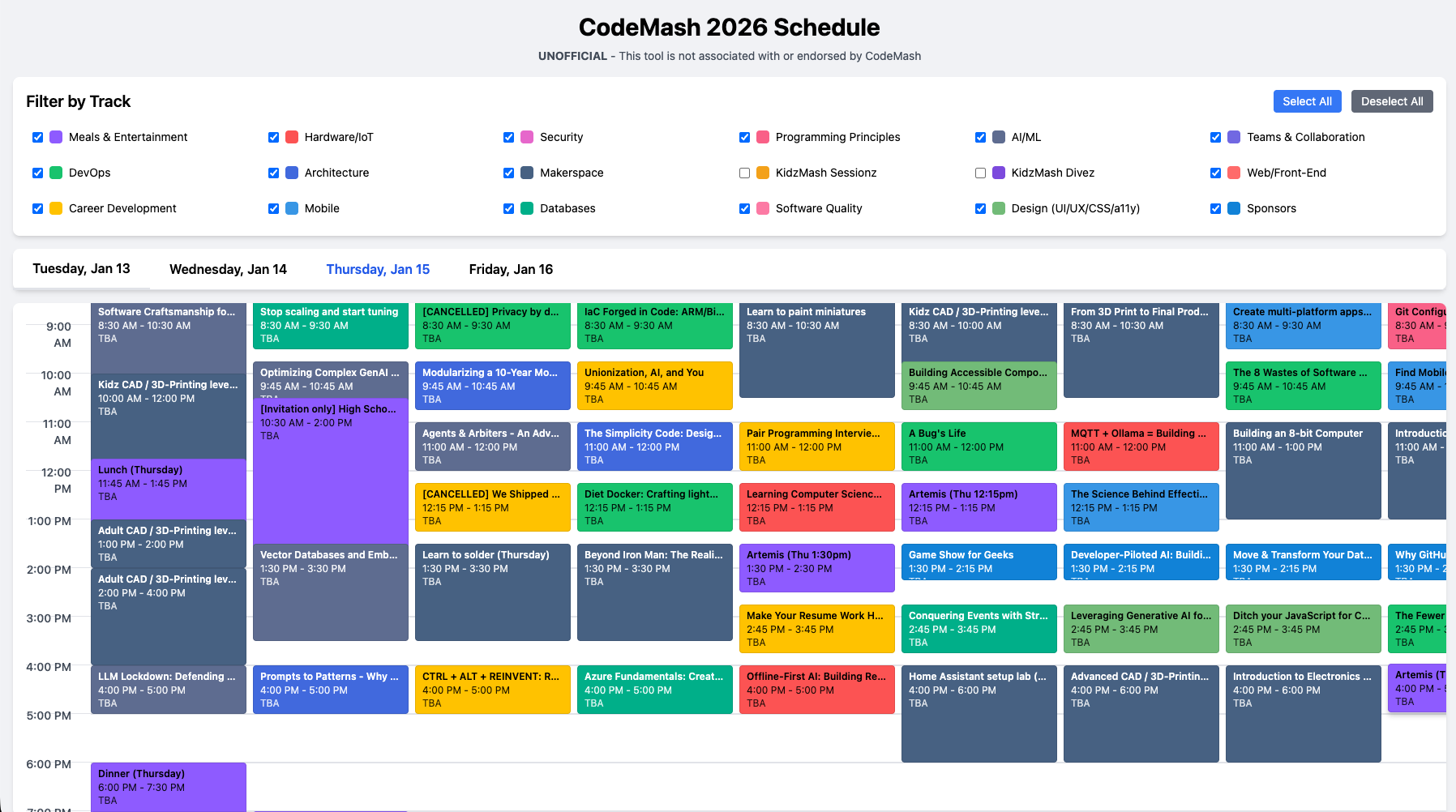
You can click on any of the calendar blocks to pop up a details page, which is a nice refinement I didn't even ask for.
Another rough edge I'm noting: your sprite is supposed to shut down when it's idle and get woken up quickly (Fly is good at this) if it doesn't have any traffic. I have yet to see it shut down; I believe there's a question on their Community site about it (and if we can see what is keeping it alive). I will be following that closely.
Cost and Performance
Fly is well-known (at least in certain circles) for their inexpensive hosting, and Sprites are no exception. Signing up gives you $30 in trial credits, which allows for the creation of a generous number of sprites. CPU time is billed at $0.07 per CPU-hour, memory at $0.04375 per GB-hour, and storage in $0.00068 per GB-hour. The site contains a breakdown of this, but in short: Their estimate is that a ~4 hour Claude Code session would cost about 46 cents. Running a web app that gets 30 hours of wake time averaging 10% of 2 CPUs and 1 gig of RAM would cost about $4 a month. So, yeah - it's cheap, and on the pay-as-you-go plan you can have up to 3 sprites running concurrently. Upgrading to a $20/mo plan gives you up to 10 concurrent, 450 CPU-hours, 1800 GB-hours of RAM, and 50GB of storage.
As to performance and machine size, I didn't find anything directly on their site. Simon Willison also wrote about this and said it's an 8GB RAM, 8 CPU server. Running sprite create is really quick - I saw no delay when doing so.
Takeaways, in no Particular Order
- As an acquaintance of mine, Manuel, often points out in our discussions: telling the model "use sqlite" is a super-power for context management. Don't ask the AI to manipulate data, ask it to write scripts to manipulate the data without looking at it. Keeping all that out of context unless you really need it gets you a lot further in the same number of tokens. This doesn't even mean creating any sort of a backend, just that you use it as a sort of intermediary data store for things you have it working on.
- Sprites has some bugs and rough edges, but it's pretty awesome. The easily deploy-ability is a big plus, and the memory allocation is generous enough that things don't feel slow.
- This was a small utility, but I'm impressed how well Sonnet nailed it in one try, with only minor tweaks needed. Yes, I could've built this myself, but I would need a few hours and the result would be uglier. This is an acceptable baseline to what I wanted.
- To be very clear on this point: If I were delivering this professionally to a client, it'd get more review and tweaking than it did. Using AI to get past the blank page problem that so many of us struggle with really helps, however.
- The agentic loop is so much faster if you don't get constant "may I do the thing?" prompts from the agent. I don't think this is ideal for every situation or type of app, but it's useful. Docker containers are an option but aren't perfectly isolated, and it's great putting them in a nice little sandbox where there's no lasting harm done if they destroy it.
- On the other hand, the agent not needing to ask if it can do the thing might reduce your opportunities to intercede if it's starting to go off the rails.
- I have some bigger thoughts on how AI is changing the industry, but they're out of scope for this post, I think. I know there's a lot of breathless hype, and a lot of cynical skepticism, both of which I find annoying. In short: I don't know what shape AI's impact is going to have, but it's pretty clear to me that it is going to have a shape. I am trying to stick to the Ted Lasso approach: "Be curious, not judgmental." Anyone who says they know exactly how this all plays out is either an idiot, selling something, or both.
Seriously - the first time I saw Litestream, my mind was blown. They hired the guy who wrote it, have continued to sponsor it, and have integrated similar things into their stack. ↩︎